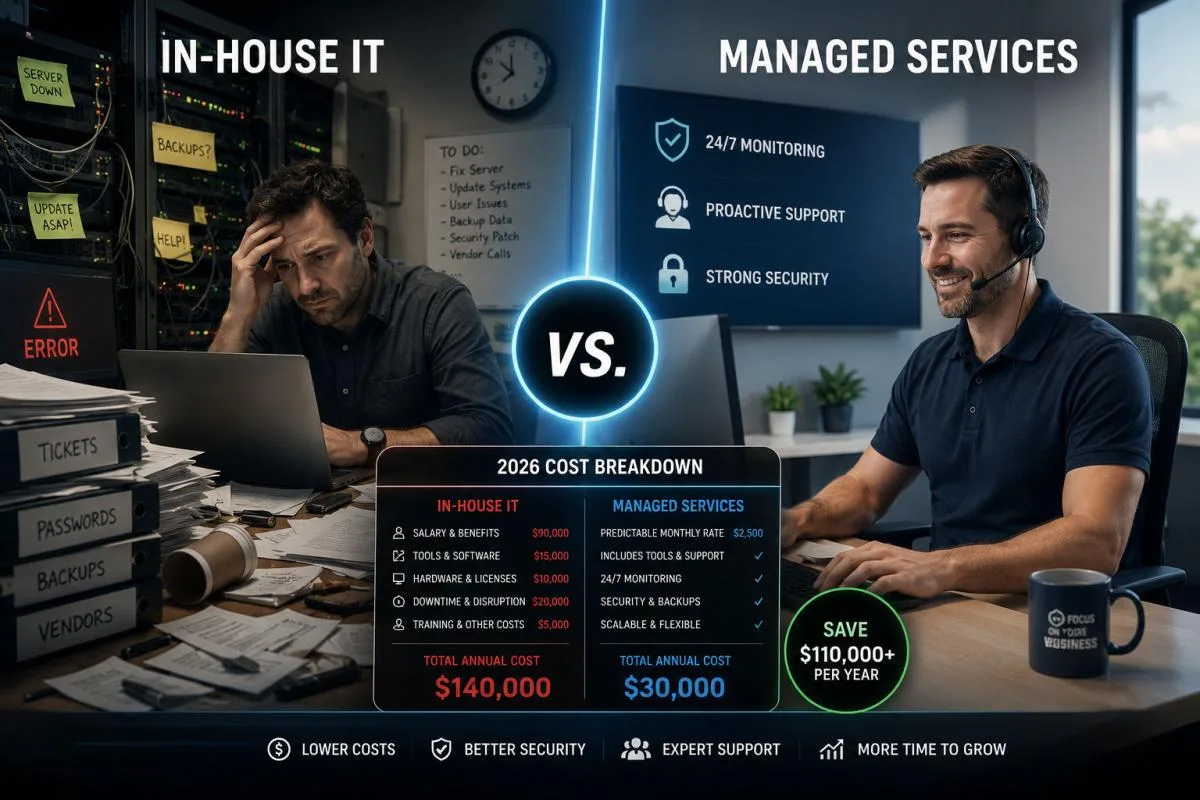
If you run a growing business, the question of in-house IT vs managed services probably keeps coming up. You need reliable technology, but you are not sure whether to hire someone or outsource the work.
It is a fair question, and the honest answer is rarely "always one or the other." It depends on the real, total cost of each path.
Too many comparisons skip the math and jump straight to a sales pitch. This one will not.
Below is a genuine 2026 cost breakdown for small businesses, including the hidden expenses most owners overlook on both sides. By the end, you will know how to calculate the true cost and choose with confidence.
In-House IT vs. Managed Services - Table of ContentsWhat "In-House IT" Actually Costs in 2026The Visible Costs
The Hidden Costs Owners Forget
The Coverage Gap Nobody Plans For
How Managed IT Services Cost WorksWhat Is Usually Included
The Hidden Costs of Outsourcing
An IT Support Cost Comparison, Side by Side
When In-House IT Still Makes Sense
The Hybrid Middle Ground: Co-Managed ITWhy Hybrid Works
How to Calculate Your True Total Cost of Ownership
Make the Smartest Choice for Your Business
Frequently Asked QuestionsWhat is the difference between in-house IT and managed services?
Is it cheaper to hire an in-house IT person or use a managed service provider?
How much does an in-house IT employee cost in 2026?
What is included in managed IT services?
When does it make sense to hire an in-house IT employee?
Can managed IT services improve cybersecurity?
What "In-House IT" Actually Costs in 2026
When most owners picture hiring an IT person, they think of one number: a salary. That number is only the beginning.
An in-house IT employee carries a stack of costs that quietly add up. Here is what belongs in an honest tally.
The Visible Costs
- Base salary. A qualified IT technician or systems administrator commands a competitive wage, and skilled talent in 2026 is not cheap.
- Benefits. Health insurance, retirement contributions, and paid time off typically add 25 to 40 percent on top of salary.
- Payroll taxes. Employer-side taxes layer on another meaningful percentage you cannot skip.
Add these together and a full-time IT technician's salary plus benefits often runs well into six figures of total cost. That is before they fix a single problem.
The Hidden Costs Owners Forget
The line items below are where in-house budgets quietly blow up.
- Training and certifications. Technology changes fast. Keeping one person current on security, cloud, and vendor certifications is an ongoing annual expense.
- Tools and software. Monitoring platforms, backup systems, security software, and ticketing tools are not free. One employee still needs the same toolset a whole team would use.
- Recruiting and turnover. If your IT person leaves, you face recruiting fees, lost knowledge, and weeks of downtime while you rehire and retrain.
- Management overhead. Someone has to supervise, review, and support that employee, which costs leadership time.
The Coverage Gap Nobody Plans For
Here is the biggest weakness of a one-person IT department: a single human cannot cover everything.
When your IT person is sick, on vacation, or asleep, your coverage drops to zero. Technology problems do not wait for business hours.
A server failure at 2 a.m. or a ransomware attack on a holiday weekend becomes an emergency with no one watching. That gap carries real financial risk in lost productivity and downtime.
How Managed IT Services Cost Works
The managed IT services cost model is built differently. Instead of one salary, you pay a predictable flat monthly fee for an entire team and a full toolset.
A managed services provider, or MSP, becomes your outsourced IT department. You get broad capability without the overhead of building it yourself.
What Is Usually Included
- Whole-team coverage. You gain access to specialists across security, networking, and support, not just one generalist.
- 24/7 monitoring. Systems are watched around the clock, so issues are often caught before you notice them.
- Included tooling. Monitoring, backup, and security platforms come bundled into the fee instead of billed separately.
- Predictable budgeting. A flat monthly cost makes planning far easier than absorbing surprise repair bills.
This is the heart of the outsourced IT support value: you trade a heavy fixed payroll cost for a flexible, scalable service. To see how a full-service model is structured, explore Zevonix managed IT services.
The Hidden Costs of Outsourcing
To be fair, managed services has trade-offs too. A good comparison names them.
- Less day-to-day physical presence. Remote-first support is fast, but some businesses prefer someone walking the floor.
- Provider quality varies. Not every MSP delivers strong response times or security depth, so vetting matters.
- Scope creep. Projects outside your agreement may carry added fees, so clarity up front is important.
An IT Support Cost Comparison, Side by Side
Put the two models next to each other and the picture sharpens. This IT support cost comparison is about total value, not just the sticker price.
With in-house IT, you pay salary, benefits, taxes, training, tools, and turnover risk, and you still have coverage gaps. With managed services, you pay one flat fee for a team, around-the-clock monitoring, and bundled tooling.
For many small businesses, hiring a single in-house technician costs more in total than a comprehensive managed plan, while delivering less coverage. The team model spreads expertise and risk in a way one person cannot match.
That said, cost is only half the equation. The right answer also depends on your size and complexity.
When In-House IT Still Makes Sense
Outsourcing is not automatically the winner. There are clear situations where hiring internally is the smarter move.
- You are large enough to keep a team busy. Once you have a few hundred employees, a dedicated internal staff can be justified and efficient.
- Your technology is deeply specialized. If software is your core product, in-house engineers who live in your systems add real value.
- You need constant physical presence. Some operations, like certain manufacturing or lab environments, benefit from hands-on staff every day.
The point is to match the model to your reality, not to follow a trend.
The Hybrid Middle Ground: Co-Managed IT
You do not have to choose all-in-house or all-outsourced. A growing number of businesses pick a co-managed model that blends both.
In a co-managed setup, you keep an internal person or small team and partner with an MSP to fill the gaps. Your staff handles daily, on-site needs while the provider supplies after-hours coverage, deep security expertise, and enterprise-grade tools.
Why Hybrid Works
- You eliminate the coverage gap. When your employee is out, the MSP keeps watch.
- Your staff gets backup. Specialists handle complex projects so one person is not stretched thin.
- You scale smoothly. As you grow, you adjust the balance instead of rushing to hire.
For businesses caught between models, co-managed IT often delivers the best of both at a sensible cost.
How to Calculate Your True Total Cost of Ownership
To compare fairly, you need total cost of ownership, or TCO. TCO is the complete cost of a choice over time, not just the obvious price.
Work through these steps for an honest number.
- Add every in-house line item. Salary, benefits, payroll taxes, training, certifications, software, and tools all count.
- Factor in risk. Estimate the cost of downtime during a coverage gap or a turnover event.
- Get a flat managed quote. Compare it against that full in-house total, not against salary alone.
- Weigh the intangibles. Faster response, stronger security, and predictable budgeting all carry value.
One more hidden expense deserves attention on both paths: software sprawl. Paying for overlapping platforms quietly drains budgets, a problem we cover in the hidden cost of too many business software tools.
When you run the full TCO, the comparison becomes clear instead of emotional. You can finally answer "should I outsource IT or hire in-house" with numbers behind you.
Make the Smartest Choice for Your Business
Choosing between in-house IT vs managed services is really about matching coverage, cost, and risk to where your business is today. With a real TCO breakdown in hand, you can decide with clarity rather than guesswork.
Zevonix helps small and mid-sized businesses across Florida and Georgia, from Jacksonville and Daytona Beach to Atlanta and Savannah, find the right fit, whether that is fully managed or co-managed support. Contact our team for a straightforward conversation about your true IT costs and the smartest path forward.
Frequently Asked Questions
What is the difference between in-house IT and managed services?An in-house IT team consists of employees who work directly for your company, while managed IT services are provided by an external company that remotely and on-site manages your technology for a predictable monthly fee. Managed services typically include monitoring, cybersecurity, backups, help desk support, and strategic IT planning.Is it cheaper to hire an in-house IT person or use a managed service provider?For many small businesses, managed IT services are more cost effective. An in-house employee requires salary, benefits, payroll taxes, training, software, and ongoing management, while a managed service provider delivers an entire team and technology stack for one monthly price.How much does an in-house IT employee cost in 2026?The total annual cost often exceeds the employee's salary after factoring in benefits, payroll taxes, certifications, software licensing, recruiting, and training. The exact amount depends on experience and location, but total compensation is commonly well into six figures.
What is included in managed IT services?Most managed IT providers include help desk support, 24/7 monitoring, cybersecurity protection, patch management, backup and disaster recovery, Microsoft 365 support, network management, and proactive maintenance. Services vary by provider, so always review what is included.When does it make sense to hire an in-house IT employee?Hiring internally is often the better choice for organizations with hundreds of employees, businesses that require constant on-site support, or companies developing highly specialized software or technology products.Can managed IT services improve cybersecurity?Yes. Most managed service providers offer enterprise-grade cybersecurity tools, continuous monitoring, threat detection, endpoint protection, vulnerability management, and security best practices that many small businesses cannot easily maintain on their own. https://zevonix.com/in-house-it-vs-managed-services-cost/


Comments
Post a Comment